This option allows you to make your own kcc models either on your own data (local table) or from ChEMBL.
From your own data:
- Read in a chemical spreadsheet containing your chemical 2D structure (mol column) and an activity column containing data such as pKd, mM, uM or nM.
- Select MolScreen/ Make Chemical Classification Model
- Select the Local Table tab.
- Give your model a unique name.
- Find your chemical table from the drop down list.
- Find the column name containing activity data from the drop down list.
- Select the activity unit pKd, mM, uM or nM.
- Select whether you would want pKa charge prediction.
- Click OK.
From ChEMBL data:
- Give your model a unique name.
- Enter a Uniprot ID (e.g. 5ht1f)
- Select whether or not you want to include all mammalian data or just human.
- Check makemodel to make the model immediately.
How to use the model to predict:
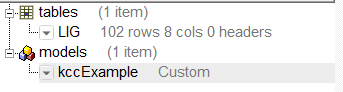
- When the model has been built you will see the model listed in the ICM workspace as shown below.
To run the model against a set of chemicals:
- Read in a chemical spreadsheet containing your chemical data.
- Right click on the model in the ICM workspace and choose Predict.
- Enter the table name and prediction model you would like to use.
- Once the prediction has finished you will see three additional columns: the kcc value, kca value and the Tanimoto distance to the nearest compound in the model dataset.