[ MolCart License | Connect to MolCart | MolCart Compounds | MolCart SDF | Molcart New Database | Faq molcart text search | Movie montecarlo | View Stack ]
- How do I generate the hostid for my MolCart license?
- How do I connect to Molcart?
- How can I download the MolCart vendor compounds provided by MolSoft?
- I have a database in MolCart and I want to save it in SDF format - how can I do this?
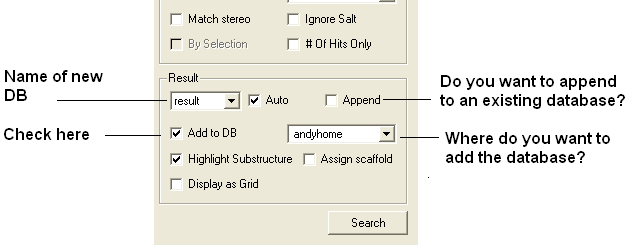
- How do I make a new molcart database from a query search?
- How do I perform a text query on a database in MolCart?
- Download MolCart from www.molsoft.com/support and unpack it.
- run run /usr/molcart-1.9-5/sysid and send the number to support@molsoft.com
When you unpack the MolCart distribution from www.molsoft.com/support you will be given a unique number (which you need to send to support@molsoft.com to get a MolCart license) along with MolCart login details such as Server Name, UserName and Password.
Once you have the MolCart distribution loaded you can connect to MolCart by going to Tools/Chemistry/Connect to Molcart
MolCart Compound Database is an up-to-date collection of vendor compound databases. This database is divided into three collections:
- Screening Compounds for cherry picking.
- Building blocks for combinatorial chemistry
Each collection consists of two components:
- a single non-redundant set of compounds, with a list vendors and vendor-IDs for each unique compound
- the original files with the full set of fields as provided by each vendor
The MolCart compounds can be downloaded from http://www.molsoft.com/screening.html then to unpack them type:
zcat vendor.gz | mysql -h<hostname> -u<user> -p<password> molcart_database_name
In the terminal window type:
write molcart table="molcart_table_name" "name_of_sdf"To write the data from a query to a new MolCart database table use the Add to DB option in the Chemical Search window.
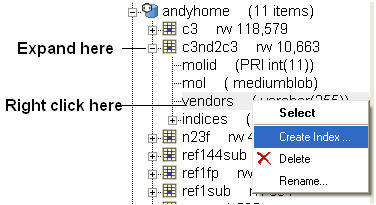
To perform a text search an index needs to be made on the field you wish to search. To do this:
- Expand the contents of the database in the ICM workspace by clicking on the '+' sign.
- Right click on the field you wish to text search.
- Select Create Index
- Select Keyword Search
- Once the index has been created you should see the text query box appear next time you perform a query.
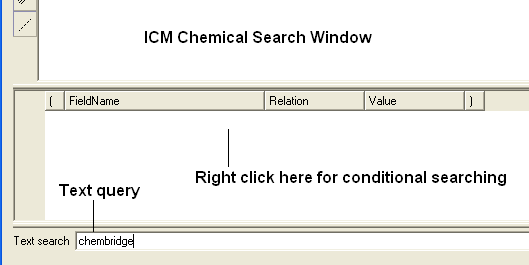
| NOTE: Queries can also be made in the window above the text search window (see above). If you right click you will see fields that you can fill in and use conditional based queries. |
To make a movie simply use the command :
montecarlo movie
To write all the buffered output to a file
On your UNIX command line
icm < montecarlo.scr > output.icm
where montecarlo.scr is your montecarlo ICM script
Once any monte-carlo simulation is complete a stack of the most energetically favorable solutions is generated along with the associated energy for each element of the stack. To view this stack:
- MolMechanics/View Stack.
- Double click on each element in the stack (table) to load it into ICM.