Setup
- Download ActiveICM from www.molsoft.com/support . Please always check you are using the latest version.
- Save an ICM file (.icb) containing slides. Click here to see how to make slides.
Enable the Developer Menu:
- Click on the File tab, and then click Options menu.
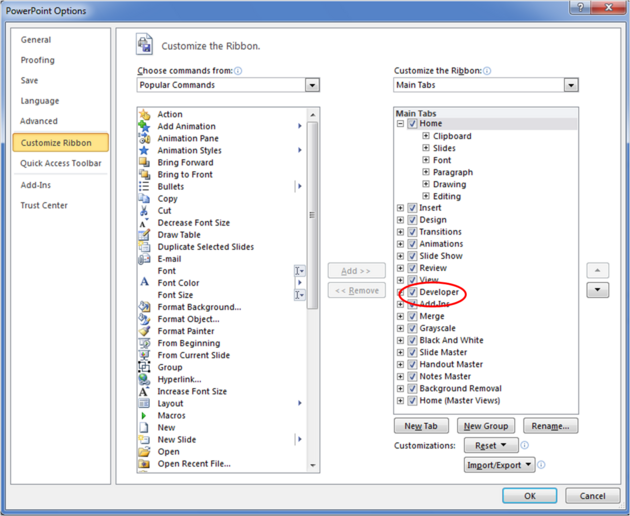
- Select the Customize Ribbon option and then check the Developer option in the right hand side panel (see image below).
- Click on the Developer Menu.
- IMPORTANT! Click OK and then you will see the Developer Menu in the Ribbon at the top of PowerPoint.
- Select the Developer menu.
- Select the More Controls button in the Controls field.
- Select ActiveICMCtl Class from the list of controls and click OK.
- Click the mouse anywhere in the white PowerPoint space and a dialog box will be displayed asking you to select your ICM (.icb) file.
- Click and drag at the corners of the image to resize the normal way you would resize an object in PowerPoint.