| Prev | ICM User's Guide 7 Slides & ActiveICM | Next |
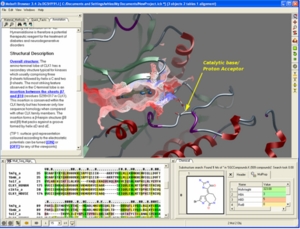 In this chapter you will find a description of the tools available to create files (.icb) containing fully-interactive three-dimensional (3D) molecules and two-dimensional (2D) data. These files can contain multiple interactive views and animations of molecular structures and objects in conjunction
with related hyperlinked text, chemical, biological sequence, alignment and data views. The files are small and easily transferable and downloadable. The files can be used for Molecular Presentation and Documents inside the ICM browser or displayed on the web and in PowerPoint using the ActiveICM plugin. For examples of ICM Molecular Documents please see MolSoft's ActiveICM product page at www.molsoft.com/activeicm.html
In this chapter you will find a description of the tools available to create files (.icb) containing fully-interactive three-dimensional (3D) molecules and two-dimensional (2D) data. These files can contain multiple interactive views and animations of molecular structures and objects in conjunction
with related hyperlinked text, chemical, biological sequence, alignment and data views. The files are small and easily transferable and downloadable. The files can be used for Molecular Presentation and Documents inside the ICM browser or displayed on the web and in PowerPoint using the ActiveICM plugin. For examples of ICM Molecular Documents please see MolSoft's ActiveICM product page at www.molsoft.com/activeicm.html
Chapter Contents:
- Making Molecular Slides
- How to View and Navigate Slides
- How to Edit Slides
- How to Add Smooth Blending and Transition Effects Between Slides
- How to Make Molecular Documents - Link HTML Text to Slides
- ActiveICM - ActiveICM enables you to view and display ICM graphical slides and animations interactively inside Windows Microsoft PowerPoint and web browsers such as Internet Exporler and Mozilla Firefox.
- IcmJs is a JavaScript/HTML5 version of the ActiveICM plugin.
| Prev Screenshot Movie | Home Up | Next Make Slides |