[ Search prosite | Binding site analysis | Pdb sequence generation | Pdb merge | Search pdb headers ]
searchSeqProsite. For example:
read pdb "2dhf"
  make sequence a_1.1        # sequence of a PDB structure
  show sequence
  find prosite 2dhf_a        # 2dhf_a is the sequence of the protein
There are three algorithms (A, B, and C) with ICM which can identify pockets:
| option | target | macro |
|---|---|---|
| A | closed pockets | `icmCavityFinder |
| B | almost closed pockets | --{make map potential} , etc., see below |
| C | pockets with good ligand-binding potential | `icmPocketFinder |
Example:
|
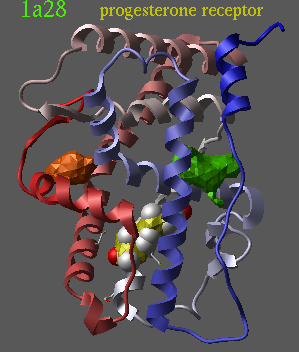
|
In the following example we find an almost closed pocket which can not be identified with icmCavityFinder .
read pdb "1fm6"  # read the 'a' chain of RXR
 delete a_!1,9    # keep the RXR and its ligand only
 make map potential a_1 Box( a_ 1. ) 1.  # grid size 1.5 A
 make grob m_atoms exact 0.1 solid
 split g_atoms
 cool a_
display g_atoms2 reversemake grop m_atoms , or try to convert
object to the ICM type (the conversion will add hydrogens and make
the object more dense).
l_commands=no
 errorAction="none"        # if something goes wrong do not
                           # interrupt the loop
 s_pdbDir = "/data/pdb/"   # make sure you have correct path
 pdbDirStyle = 4           #
 read sarray s_pdbDir+"/derived_data/index/source.idx"
                          # you need a list of all pdb-entries
                          # (4 char. code per line will do)
 source = Tolower(Trim(Field(source,1)))
 n=Nof(source)
 for i=5,n
   read pdb sequence resolution source[i]
        # append resolution to the chain name (like 9lyz_a19)
 endfor
 group sequence "*" uniqSeqs unique 0.1 delete
        # cutoff inter-sequence
        # distance 0.1 (dissimilar by more than 10%)
#
# Other possibilities
#
#  group sequence uniqSeqs unique 5     # if two seqs differ by more
#                                       # than 5 mutations
#  group sequence uniqSeqs unique       # throw away only identical
#                                       # sequences
#

 write sequence s_inxDir + "/pdb1.seq"
                               # actual sequences for searches
 write Name(uniqSeqs) "chainList"
                               # list of protein chains if you need it
quitread pdb "1crn"
read pdb "1d48"
move a_2. a_1. # merges objects
write pdb a_1. "both" # saves both files in pdb format
write object a_1. # saves merged object in compact binary formBefore or after merging, the objects can also be edited, translated to a new position,
rename chains, change residue numbers etc.
Example:
read pdb "1d48"
 delete a_w*
 delete a_2       # delete the second chain
 read pdb "1crn"
 delete a_/33:99  # delete a C-term. part of crambin
 move a_1. a_2.   # merge the remains
 write object a_
If you want to re-engineer a polypeptide chain of a protein, using two pdb-files, e.g. to transplant one part of a protein to another and restore the bonding connectivity, you may use the
modify command:
read pdb "1crn"  # one pdb
 read pdb "1cbn"  # similar protein
 modify a_1./20:25 a_2./20:25
   # grafts a loop from 2nd object to the 1st one
write pdb a_1. "combo"- In unix: grep -i kinase PDB.tab
- From ICM: you have more possibilities:
read table s_icmhome+"data/inx/PDB.tab" # or in s_userDir+"inx/" show PDB.head ~ "kinase" # or show PDB.head ~ "*kinase*" # or show PDB.comp ~ "kinase*" # regular expressions # You can also a=PDB.head~"kinase" for i=1,Nof(a) nice PDB.ID pause delete a_*. endfor - Use the gui (Find.In PDB.By Keyword..)