Google Search the Manual:
Keyword Search:
| Prev | ICM User's Guide 22.3 Protein Modeling and Engineering | Next |
Linking Sequence to Structure
I. Example Setup
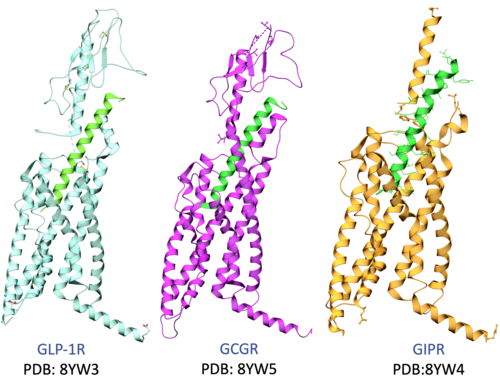
Objective: Load structural data for GLP-1, GIP, and Glucagon receptors to explore the structural basis for triple agonism.
- Import Structures: Load the following PDB entries to compare small molecule and peptide binding modes:
- GLP-1 Receptor (Small Molecule bound):
6XOX(bound to Orforglipron) [00:01:49] - Glucagon Receptor (Peptide):
8YW5(bound to Retatrutide) [00:02:40] - GIP Receptor (Peptide):
8YW4(bound to Retatrutide) [00:02:45]
- GLP-1 Receptor (Small Molecule bound):
- Interaction Visualization: Right-click the ligand in 6XOX (ligand name=rv6g) >
Display Pocketto view specific interactions within the seven-transmembrane (7TM) region [00:02:31].
II. Structural Superposition & Interactive Alignment
Objective: Spatially align receptors to identify conserved pharmacological features across the three targets.
- Superimpose: Select receptor chain "r" for each of the pdbs in the workspace (Ctrl/Cmd + click) >
Display Tab > Superimpose[00:03:26]. - Linked Sequences:
- Right-click chains >
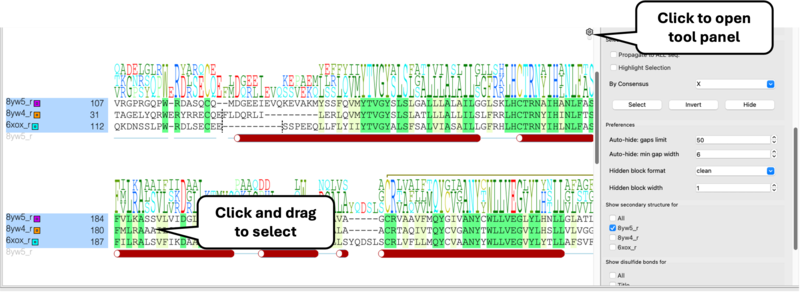
Extract Sequence[00:03:53]. - Select sequences in workspace >
Right-click > Align Sequences[00:04:06]. - Note: Selecting residues in the alignment window selects that residue in 3D and vice-versa[00:04:15].
- Right-click chains >
III. Analyzing Pocket Conservation for Polypharmacology
Objective: Identify why peptides achieve triple agonism while current small molecules are highly specific.
- Interactive Selection: Select small molecule ligand >
Right-click > Neighbors (5.0 Å)[00:04:48]. - Propagate Selection: Use the
Toolspanel in alignment >Propagate to all sequencesto reveal equivalent residues in GIP and Glucagon [00:05:25]. - Conservation Insights:
- Surface Pocket: Upper pocket is poorly conserved, explaining small molecule specificity [00:10:07].
- Deep Pocket: N-terminal peptide binding region is highly conserved across all three receptors [00:07:52].
IV. Mapping Conservation onto the 3D Surface
Objective: Create a visual heat-map of conserved residues to identify targets for polypharmacology.
- Generate Mesh: Double-click receptor chain >
Meshes > Solid Surface[00:08:22]. - Highlight "X" Residues: Select all residues marked with 'X' (100% conserved) in the alignment [00:09:04].
- Color the Surface: Right-click surface >
Color > By Atom Selection(Green, Brush size 2.0) [00:09:30]. - Key Insight: Conserved green regions are optimal contact points for designing pan-agonist small molecules [00:09:45].
V. Structural Barriers to Small Molecule Triple Agonism
Objective: Analyze specific residues that hinder or facilitate polypharmacology.
- Trp33 Analysis: In GLP-1, Tryptophan 33 forms a "lid" over Orforglipron [00:10:50].
- Cross-Receptor Comparison: Alignment shows this Trp is a Glycine in the GIP receptor [00:15:06].
- Design Implication: If Trp33 is essential for binding, the current pose won't work in GIP or GCGR, identifying a specific target for optimization [00:15:14].
Molecular Modeling
Filling in the Gaps
Filling in the Gaps
00:12:03] Identify missing residues (indicated by dashed lines in the 3D ribbon).
- Read in PDB > Search Tab > Enter "1xbb"
- Link UniProt: Right-click and choose UniProt and Construct > Extract Construct and UniProt.
- Interaction: Clicking a gap in the alignment window will automatically zoom to that region in the 3D viewer.
Filling Gaps with Homology Modeling
[00:13:38] Use the Full Model Builder to complete protein structures.
- Setup: Navigate to Homology > Full Model Builder.
- Refinement: Choose between filling gaps, refining side chains, or a Full Refinement (Monte Carlo simulation).
Loop Modeling
This tutorial demonstrates how to model flexible loop regions in protein structures using ICM's loop modeling tools. Loops are often the least well-resolved and most structurally variable parts of proteins, yet they frequently play key roles in binding, specificity, and function. In this exercise, you will learn how to select a loop region, generate and sample alternative conformations, and evaluate energetically favorable solutions using ICM’s physics-based sampling and database-assisted approaches. The workflow also illustrates how loop modeling can be integrated into structure refinement to improve local geometry and produce more accurate protein models for downstream applications such as docking and design.
Loop Grafting
This tutorial demonstrates how to replace or insert loop regions in protein structures using ICM's Graft Loop tool. Loop grafting allows you to transfer a structurally compatible loop from a template structure into a target protein, enabling rapid reconstruction of missing or poorly resolved regions. You will learn how to align the target and template structures, select appropriate loop segments based on sequence and geometry, and define the flanking residues that anchor the graft. The method then evaluates backbone compatibility and optimizes the inserted loop to ensure a physically realistic and energetically favorable conformation. This workflow is particularly useful for repairing crystal structure gaps and refining comparative models for downstream applications such as docking and design.| Prev Drug Target Analysis and Preparation | Home Up | Next Chemical Structure Analysis SAR and Library Design |