Aug 8 2008
Contents
 
Introduction
Overview - RECOMMENDED READING FOR NEW ICM USERS
File Menu
Graphics Move Tools
Display Tab
Light Tab
Labels Tab
PDB Search Tab
Meshes Tab
View Menu
Selections
Tables
 Standard
 Molecular Tables
 Plot
 PCA
 SVM and PLS
 Cluster
Local DB
Sequences
Bioinfo Menu
Tools Menu - Xray
Tools Menu - 3D Predict
Tools Menu - Analysis
Tools Menu - Superimpose
Homology and Modelling
Working with Chemistry Tools
Chemsitry Menu
Docking
Ligand Editor
Animations, Slides, & Documents
ActiveICM
Movie Making
Frequently Asked Questions
Tutorial - Graphical Display
Molecular Document
Tutorial - Working with PDB Protein Structures
Tutorial - Working with Sequence Alignments
Tutorial - Ligand Binding Pocket Analysis
Tutorial - Homology and Modeling Tools
Tutorial - Crystallographic Analysis Tools
Tutorial - Working with Chemical Tables
Tutorial - Working with the Molecular Editor
Tutorial - Chemical Searching
Tutorial - Docking and Virtual Ligand Screening
 
Index
PrevICM User's Guide
12.2 Molecular Tables
Next

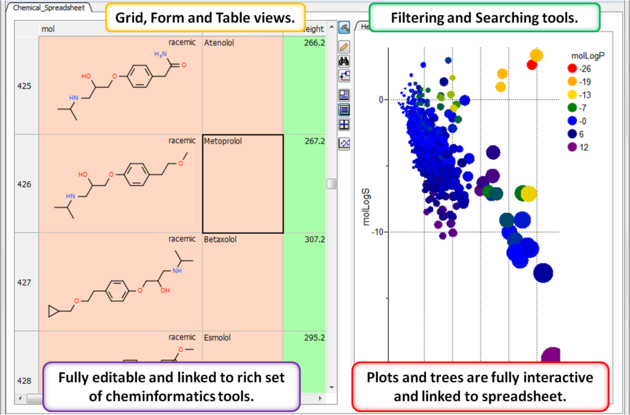
An ICM molecular table is created when an SDF or Mol file is read into ICM. To read and open a mol or sdf file go to File/Open (See Open an ICM file section) All of the table functions described in the previous section Standard ICM Table can be applied to molecular tables. Molecular tables are described in more detail in the Cheminformatics chapter.

An example of an ICM molecular table:

Prev
Table Mouse Actions
Home
Up
Next
Plot

Copyright© 1989-2004, Molsoft,LLC - All Rights Reserved.
This document contains proprietary and confidential information of Molsoft, LLC.
The content of this document may not be disclosed to third parties, copied or duplicated in any form,
in whole or in part, without the prior written permission from Molsoft, LLC.