[ Ligand Pocket Interactions | Pocket Surface | Ligand Surface ]
| Available in the following product(s): ICM-Browser | ICM-Browser-Pro | ICM-Pro |
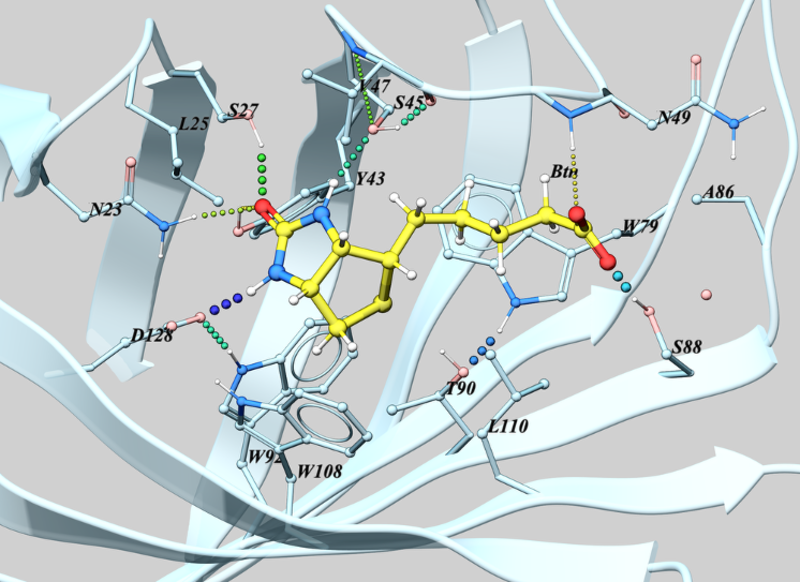
To view and center on the ligand pocket interactions.
- Right click on the ligand in the ICM Workspace and navigate to Display Pocket -> Ligand Pocket Interactions. The system will automatically display hydrogen bonds, key water molecules, and neighboring residues centered on the view.
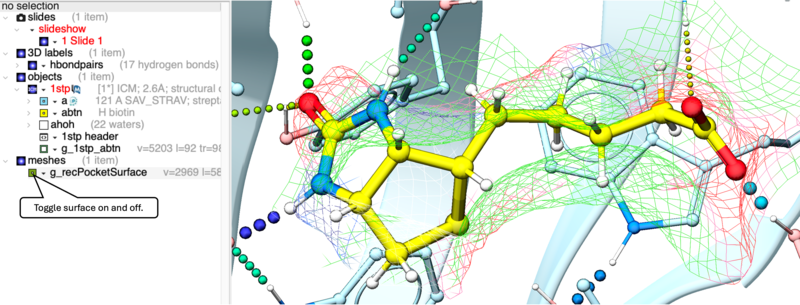
To display the Receptor Pocket Surface:
- As an example we will use the PDB structure 1STP. Type 1STP in the pdb search tab and press return.
- Convert the protein to an ICM object. If you do not convert a generic surface will be displayed that is not colored by binding property.
- Right click on the ligand "abtn" and select Display Pocket -> Receptor Pocket Mesh.
- Select whether you would like to display side-chain hydrogen bonds and label.
- The receptor pocket will be displayed and colored by binding property - White=aromatic lipophilic, Green=non-aromatic other (mostly aliphatic) lipophilic surface, Red=hydrogen bonding acceptor potential, Blue=hydrogen bond donor potential.
- The surface can be toggled on and off by selecting in the ICM Workspace in the meshes section.
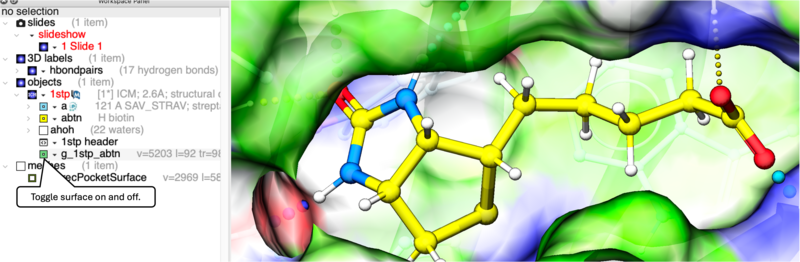
The Ligand Surface option allows you to visualize cavities that are open for ligand modifications. The ligand surface is colored with the opposite (complementary) property to the receptor surface. This allows you to easily identify modification types: matching colors between the ligand and receptor immediately highlights areas where the ligand's chemical properties perfectly complement the binding pocket.To display the Ligand Surface:
- As an example we will use the PDB structure 1STP. Type 1STP in the pdb search tab and press return.
- Convert the protein to an ICM object. If you do not convert a generic surface will be displayed that is not colored by binding property.
- Right click on the ligand "abtn" and select Display Pocket -> Ligand Surface.
- The Ligand Surface will be displayed colored by property - White=aromatic lipophilic, Green=non-aromatic other (mostly aliphatic) lipophilic surface, Red=hydrogen bonding acceptor potential, Blue=hydrogen bond donor potential.