| Available in the following product(s): ICM-Browser | ICM-Browser-Pro | ICM-Pro |
These options are in the light tab
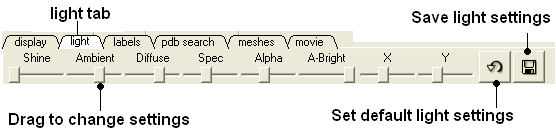
Click and drag the sliders to change the lighting. You can also save your preferred lighting settings and return to default.
Shine - shininess property of the solid material
Ambient - ambient light intensity of RGB for ambient light
Diffuse - diffuse light intensity of RGB for diffuse light
Spec - specular light intensity of RGB for specular light
Alpha - transparency setting for grob
A-Bright - light intensity shinning on grob
X and Y - Change the position of the light source in the graphics window