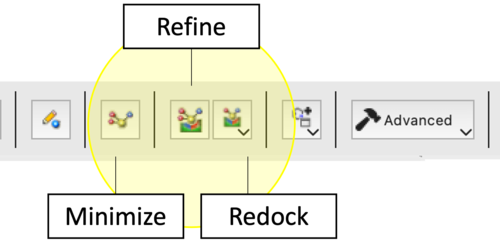
The ICM Ligand Editor utilizes three hierarchical levels of optimization to refine lead compounds. Each protocol differs in its computational cost and the degree of freedom allowed for the ligand within the receptor-defined grid potential.
Option
Protocol
Effect
Application
1. Minimize Ligand in Soft Grid
Local Gradient-Based Optimization. Employs the ICM force field to minimize the potential energy by adjusting internal coordinates. Uses soft van der Waals potentials to resolve steric overlaps.
Primarily optimizes torsions, bond angles, and lengths; ligand position/orientation remains essentially fixed.
Resolution of local strain or geometry distortions following manual covalent modifications or atom-type changes.
2. Refine Redock using Current Pose in Soft Grid
Biased Probability Monte Carlo (BPMC) Search. A local stochastic search centered on the starting pose. It explores the immediate energy landscape to identify a deeper local minimum.
Full sampling of ligand torsions combined with small-step translations and rotations.
Optimization of binding interactions (e.g., H-bond geometries) when the general binding mode is known.
3. Redock
BPMC algorithm to perform an exhaustive search of the defined grid potential. Ignores the current pose to find the global minimum.
Comprehensive sampling of the entire transitional/rotational space and all free torsions within the designated binding site.
Validation of binding modes, docking after significant scaffold hops, or when exploring potential induced-fit movements requiring a full reset of the ligand pose.
If you dock a chemical spreadsheet will be displayed with the docking results. Use the check box in column 'L' to display the docked ligand or double click to load the ligand into the ligand editor.
A guide to the table columns:
LE_Score The lower the Score the better the predicted interaction.
RTCNN (Radial Topological Convolutional Neural Net) - you can read more about this score here. The lower the better the predicted interaction.
Strain: The strain of the ligand. Lower values = less strain. (kcal/mol)
Steric: Is the van der Waals interaction energy (sum of gc and gh van der waals). Current version of the score uses explicit van der Waals interaction energy calculation (no grids). (lower the better)
Torsion: Number of torsions in ligand
Electro: is the solvation electrostatics energy change upon binding (lower the better)
Hbond: is Hydrogen Bond energy - (lower the better)
Hydroph is the hydrophobic energy in exposing a surface to water (lower the better)
Surface is the desolvation of exposed h-bond donors and acceptors (lower the better)
Once docked you can toggle the docked ligand display on or off using the "L" column in the hitlist or you can load the docked chemical into the receptor for modification:
Display the pose over the current ligand. Single click on the box in 'L' column will display the pose without loading the ligand for editing.
Load the pose as a current ligand. Double-click in any cell of the row except the box in 'L' column. That should load the ligand so you can editor it further.
How to undertake an all-atom minimization in Cartesian coordinates:
Note this option is available in ICM 3.8-4 and higher.
Click and hold on the Minimize button.
Choose Minimize in Receptor.
17.9.1 Change the Size of the Docking Region
How to change the size of the docking region:
The purple box represents the region in which the energy maps are generated. If you want to change the size of this region you can do so by displaying the box (go to Advanced menu) and clicking and dragging on the corners of the purple box. The maps will then be remade on the fly.