[ Content | Secondary Structure | Six Frame Translation | Set Sequence Type | Align Two Sequence | Sequence to Structure Alignment | Multiple Sequence Alignment | Profile | Link to Structure | Extract Sub-Alignment As Is | Cut Vertical Alignment Block | Reorder Sequences | Extract Unique Sequences | Load Example Alignment ]
| Available in the following product(s): ICM-Pro |
| Note: Click Next (top right hand corner) to navigate through this chapter. Headings are listed on the left hand side (web version) or by clicking the Contents button on the left-hand-side of the help window in the graphical user interface. |
To determine the residue content of a sequence.
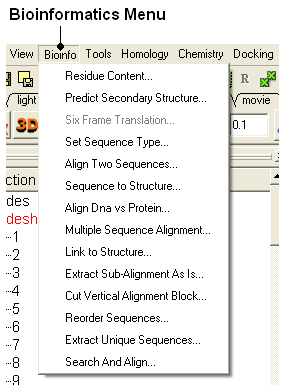
- Bioinfo/Residue Content and a data entry box as shown below will be displayed.
- Enter the sequence name. See the Load Sequence section for more information on how to load a sequence into ICM using the Graphical User Interface.
- A table and graph of residue frequencies will be displayed.
To predict the secondary structure of a sequence:
- Bioinfo/Predict Secondary Structure
- Enter the sequence name. See the Load Sequence section for more information on how to load a sequence into ICM using the Graphical User Interface.
- An option is provided to ignore currently assigned secondary structure.
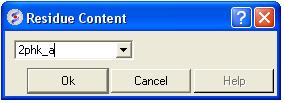
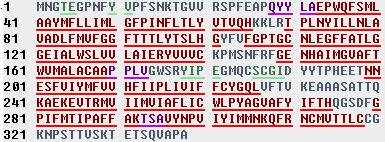
To view the secondary structure prediction click on and expand the sequence in the ICM workspace. Regions underlined in red = alpha helix, green = beta sheet, blue = pi helix, magenta = 3/10 helix.
This options returns the translated DNA or RNA sequence ('-' for a Stop codon, 'X' for an ambiguous codon) using the standard genetic code.
- Read into ICM a DNA sequence from a file (eg File/Open FASTA) or use the File/New option and cut and paste a DNA sequence.
- Bioinfo/Six Frame Translation
- Translate all frames or use start codon.
This option allows you to define whether a sequence that is read into ICM is a protein or nucleotide sequence.
- Read into ICM a sequence (eg File/New and cut and paste sequence or File/Open FASTA)
- Bioinfo/Set Sequence Type
- Select the sequence name using the drop down button
- Select sequence type protein or DNA.
Please see the Alignment Chapter.
Please see the Alignment Chapter.
Please see the Alignment Chapter.
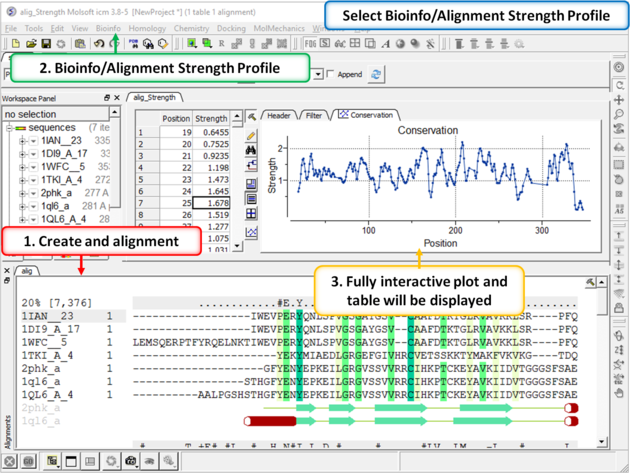
To view a fully interactive alignment strength profile:
- Create an alignment.
- Bioinfo/Alignment Strength Profile
- A fully interactive table and plot will be displayed.
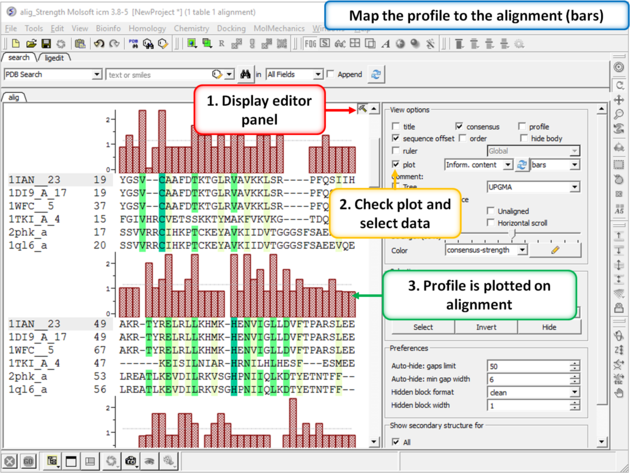
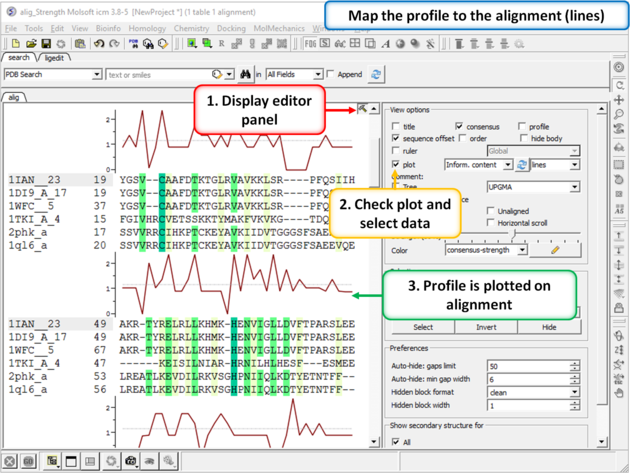
The profile can be plotted onto the alignment:
- Open the alignment editor panel.
- Select the plot checkbox and choose either bars or line plot.
To link a structure to an alignment:
- Double click on the structure in the ICM workspace to select it.
- Bioinfo/Link to Structure
| NOTE Links are described in more depth in the Making Links Section of the manual. |
On occasion you may want to extract a sub alignment from a bigger alignment. For example you wmay only wanto extract the alignment for the sequences linked to a structure.
To extract a sub-alignment:
- An initial multiple sequence alignment must first be displayed in the graphical user interface.
- Bioinfo/Extract Sub-Alignment As Is
- Enter the name of the alignment from which you wish to extract a sub-alignment from.
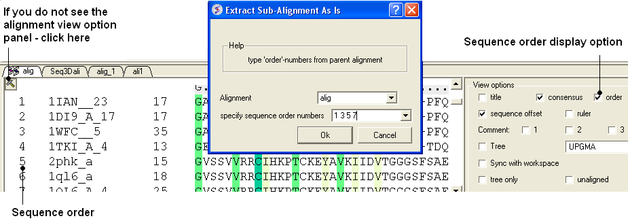
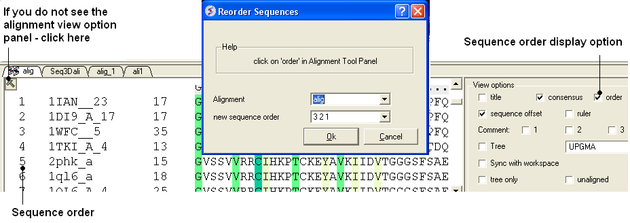
- Specify the sequence order numbers you wish to extract - enter each number separated by a space.You can see the sequence order alignment number by selecting the order option in the alignment view options panel. See image below below.
- Click OK and the extracted sequence alignment will be displayed in a separate alignment tab.
To cut a vertical alignment block:
- An initial alignment must first be displayed in the graphical user interface.
- Bioinfo/Cut Vertical Alignment Block
- Enter the alignment from which you wish to cut from.
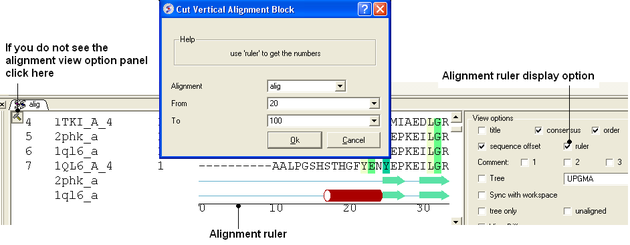
- Enter the region of the alignment you wish to cut (from: to:). The easiest way to determine the region to cut is to display the ruler in the alignment. This is an option in the alignment view panel - see image below.
- Click OK and the cut section will be displayed in a new alignment.
To reorder sequences in an alignment
- An initial multiple sequence alignment must first be displayed in the graphical user interface.
- Bioinfo/Reorder Sequences
- Enter the alignment name
- Enter the new sequence order.You can see the sequence order alignment number by selecting the order option in the alignment view options panel. See image below below.
To extract unique sequences from a group of sequences:
- Read into ICM the sequences you wish to make unique.
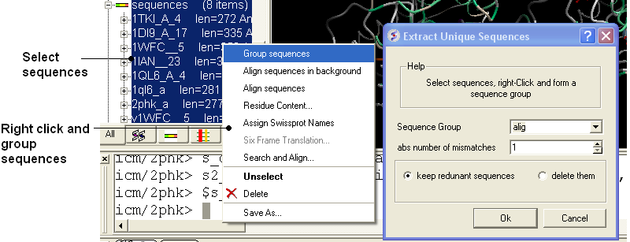
- Select the sequences. A sequence can be selected by double clicking (highlighted blue in ICM workspace) - a range of sequences in the ICM Workspace can be selected by holding down the SHIFT button and double clicking. A non-contiguous selection can be made by holding down the CTRL button and double clicking.
- Right click on the sequence selection in the ICM Workspace and select Group sequences
- Bioinfo/Extract Unique Sequences
- Enter the name of the sequence group.
- Enter the number of residue mismatches necessary to determine that a sequence is unique or not.
- Select whether you want to keep the redundant sequences or delete them from ICM.
To see an example of an alignment select:
- Bioinfo/Load Example Alignment