| Available in the following product(s): ICM-Pro |
Once a molecular model has been constructed it is generally a good idea to analyze it using the Protein Health macro. The results from protein health will indicate which part of the molecule is strained or has unusual geometry. A way of solving these problems is to refine or optimize the side-chains. Other ways to minimize or optimize the structure are available in the MolMechanics/Minimize menu.
To refine or optimize a selection of side chains the structure needs to be an ICM object.
- Make a selection of the side chains you wish to optimize. See how to make selections section.
- Right click on the selection in the graphical display. A selection will be displayed as green crosses.
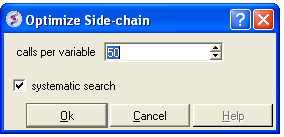
- Select from the right click menu Advanced/Optimize Side Chains and a data entry box as shown below will be displayed.
- Enter the number of calls per variable you wish to use for the simulation. For more details on this please see the ICM language manual.
A stack of energy conformations will be displayed in a table. Each conformation can be viewed simply by clicking in the table.