[ Install | Start | Create DB and Import | Search | Admin ]
| Available in the following product(s): MolCart |
Molcart is an enterprise wide chemical management system. Compound databases of any size can be stored in MolCart and analyzed and searched using ICM cheminformatic tools.
In order to run MolCart it is necessary to install the Free Open Source MySQL database on your machine. Please see your systems administrator or see http://dev.mysql.com/downloads/ Contact MolSoft info@molsoft.com for MolCart download and installation instructions.
To start Molcart:
Tools/Connect Molcart
Once you have activated MolCart the loaded databases and users will be shown in the ICM Workspace as shown below.

All the records and fields contained within each database can be viewed by expanding the tree structure in the ICM Workspace.
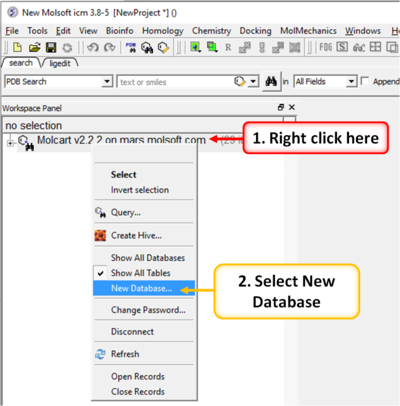
To make a new database:
- Right click on the top of the MolCart tree and then choose New Database
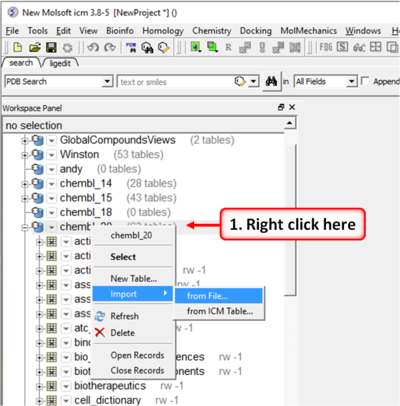
To upload SDF, csv, SMILES or MOL files or an ICM table:
- Right click on the database where you wish to add the file.
- Select Import.
How to search the databases contained within MolCart
Click on the button shown below.

To begin processing your query first you need to decide which database to search. The options are listed in the "Data Source" section of the ICM chemical search window.
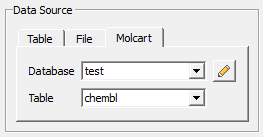
You can either search a local table (molecular table) or you can search MolCart.
If you select MolCart you first need to setup the link to the correct database - described earlier. Click on the button shown above (yellow pencil) and the Connect to Molcart window will be displayed as shown below.
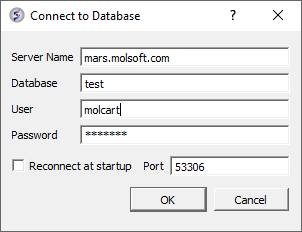
- Enter the Server Name in which the database is stored.
- Enter the database name.
- Enter your username and password for the server.
- You can save these details so you do not have to re-enter this information each time you use the chemical similarity search.
See the Chemical Search section of this manual on the many different search procedures.
How to perform a text search
To perform a text search on one of the databases contained within Molcart you first need to index the text within the database and then search using the query option.
To make the database index, see text and picture below:
- Expand the tree of the database in the ICM Workspace.
- Select the column headers you wish to search which contain Full Text or Partial Text(the data type for each column is listed next to the column name). Multiple column headers can be selected by clicking and holding down the CTRL key. A range of column headers can be selected by holding down the shift key and clicking to select.
- Next, right click and select Create Index.
- Select 'Full Text' and you will notice an additional header in the ICM Workspace called 'indices'. The value in the items category represents the number of columns you have chosen to text search.

To perform the text search:
- Right click on the database name in the ICM Workspace.
- Select 'Query' as shown below.

The ICM Chemical Search query window will be displayed as shown below. Type your query text in the space provided and hit the enter key or click on the search button.

How to add conditions to your query
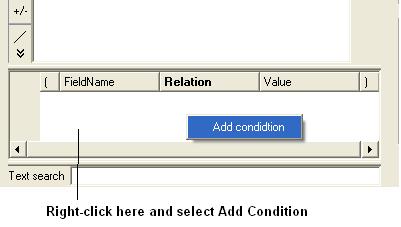
- Right click in the box shown below and select 'Add Condition'. You can add as many conditions as you like.
- Double click in the fields labeled "Name" and "Relation" and select the options from the drop down arrow or type in values.
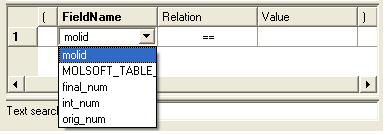
To remove a condition, right click on the filter and select 'Remove Filter'.
Edit Password
- Right click on the MolCart header in the ICM Workspace and select Change Password.
Add a New MolCart User - Root Only
- Right click on the User Section of MolCart in the ICM Workspace as shown below.

- Select the New User Option.
- Add new username and password in the data entry box.
- New user will be displayed in the ICM Workspace.
Edit User Privileges - Root Only
- Right click on the user in the ICM Workspace.
- Select Edit Privileges and a data entry box as shown below will be displayed.
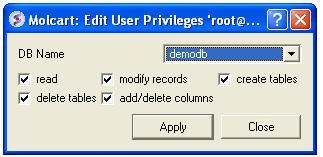
- Select the database name.
- Edit the privileges by checking or unchecking the appropriate boxes.
Add a New Database
- Right click on the MolCart Header in the ICM Workspace as shown below.

- Select the New Database option.
- Enter a unique name for your new database.
- The new database name will appear in the ICM Workspace.
- Now you need to add data to your new database (See Instructions Below).
Add New Data to Database
- Right click on the database name in the ICM Workspace as shown below.

- Select New Table.
- Select either Import from SD file or Import from ICM table.
- Select the appropriate file and the records structure of your sdf or ICM table will be displayed as shown below.

- The database name can be changed at this point and the fields contained within the database can be altered. Certain fields can be excluded by checking the boxes - this will help in minimizing the size of a database. Caution must be taken if you want to change the field type or length.
- Click OK and your sdf file or ICM table will be added to the database. This can be seen by expanding the tree structure in the ICM Workspace.
Delete a Database or User
- Right click on either the database or user in the ICM Workspace.
- Select Delete.