[ Save Workspace | Save Chemical Spreadsheet as SDF | Export to Excel | Save Molecular Editor | Save 3D Chemicals | Saving Chemical Images | IUPAC Name ]
| Available in the following product(s): ICM-Chemist | ICM-Chemist-Pro | ICM-VLS |
There are a variety of ways to save chemical structures. Chemicals can be saved in mol, sdf and smiles format from a chemical table (spreadsheet), molecular editor or from the ICM-Workspace. An image of the 2D sketch can be saved as an image from a chemical table.
If you wish to save your chemical spreadsheet and plots and setup.
- File/Save As - ICM Binary Format (.icb)
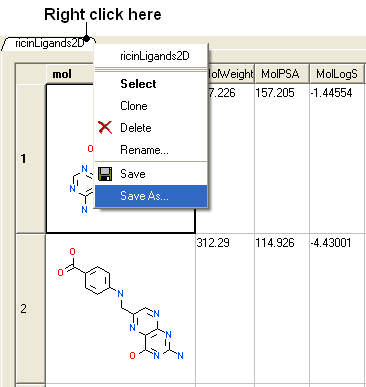
To save all the chemicals in a table as an SDF file:
- Right click on the chemical table header.
- Select Save as..
- Select Save as type: (SD file, Mol file or comma separated value - csv)
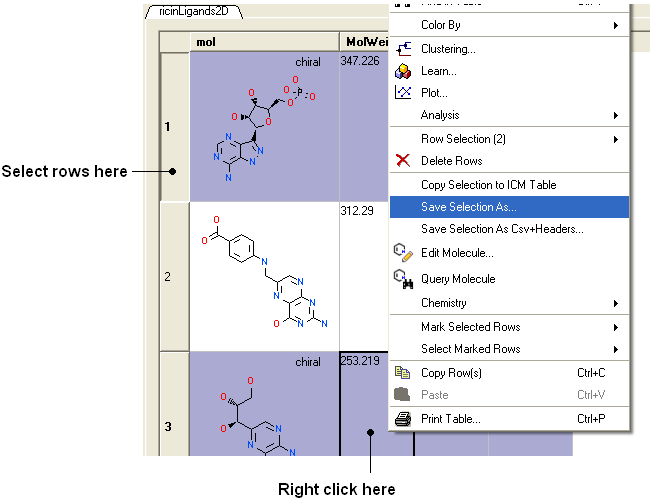
To save selected chemicals in a table as an SDF file:
- Select the row(s) of the chemicals you wish to save in SDF format. Row selections in tables is described in the Tables chapter.
- Right click on any of the selected rows and select Save Selection As....
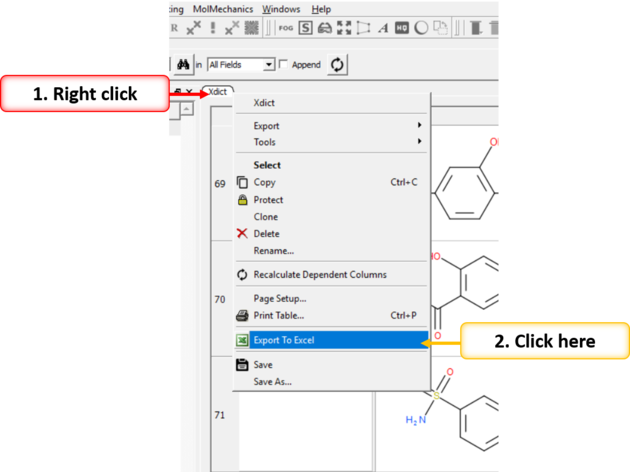
To export to Excel:
- Right click on the table header and select "Export to Excel".
Chemicals drawn in the ICM Molecular Editor can be saved:
- File/Save or File/Save As... or Edit/Copy as SMILES
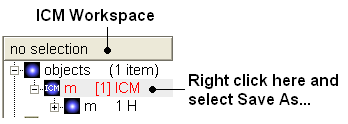
If you have converted a chemical sketch into 3D, the 3D structure will be displayed in the ICM Workspace. To save this structure in mol format:
- Right click on the name of the chemical in the ICM Workspace.
- Select Save As..
To save an image of a chemical sketch:
- The chemical needs to be displayed in a chemical table.
- Right click on the 2D image
- Select Save Molecule As Image
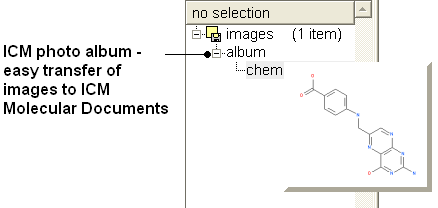
| NOTE Using the right click options you can also save the image to the clipboard or copy the molecule to the ICM Image Album for use in Molecular Documents. |
The IUPAC nomenclature for a compound can be generated on the fly for a chemical. You can view the IUPAC name in the Molecule Editor or you can insert a column into a chemical spreadsheet with the IUPAC name.