| Available in the following product(s): ICM-Chemist | ICM-Chemist-Pro | ICM-VLS |
To compare two chemical tables for similar compounds:
- Read the two tables into ICM.
- Chemistry/Compare Two Sets...
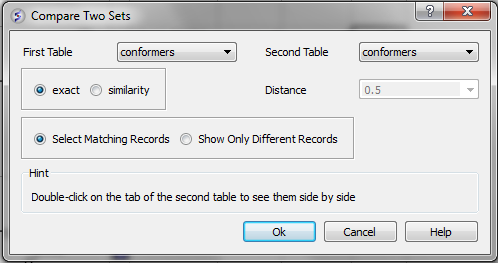
- Select the first table from the drop-down list and then select the second table.
- Choose whether you want to use exact or similarity comparison. If the similarity option is selected a Distance value needs to be entered. The distance value should be decreased below 0.5 (0.2 or 0.3 or even smaller if you want to find "strong" similarity differences. The distance relates to the Tanimoto distance as described here
- Choose whether you want to Select Matching Records or Show Only Different Records.
- Select OK
- Similar compounds will be highlighted blue (selected). A selection can be transferred to a new table by right-clicking on the table and select Copy Selection to ICM Table.