Sep 17 2008
Contents
 
Introduction
Overview - RECOMMENDED READING FOR NEW ICM USERS
File Menu
Graphics Move Tools
Display Tab
Light Tab
Labels Tab
PDB Search Tab
Meshes Tab
View Menu
Selections
Tables
Local DB
Sequences
Bioinfo Menu
Tools Menu - Xray
Tools Menu - 3D Predict
Tools Menu - Analysis
Tools Menu - Superimpose
Homology and Modelling
Working with Chemistry Tools
Chemsitry Menu
 Calculate Properties
 Standardize Table
 Build Prediction Model
 Predict
 Convert Smiles to 2D
 Convert Structure to Smiles
 2D Depiction
 Convert to 3D
 Generate 3D Conformers
 Generate Tautomers
 Convert to Racemic
 Generate Stereoisomers
 Align/Color by 2D Scaffold
 Cluster Set
 Compare Two Sets
 Merge Two Sets
 Sort Table
 Select Duplicates
 Enumerate by Markush
 R-Group Decomposition
 Enumerate by Reaction
 Superposition
 Chemical Search
 Pharmacophore Search
 Find & Replace
 Fragments
 Molcart
Docking
Ligand Editor
Animations, Slides, & Documents
ActiveICM
Movie Making
iSee Wizard
Frequently Asked Questions
Tutorial - Graphical Display
Molecular Document
Tutorial - Working with PDB Protein Structures
Tutorial - Working with Sequence Alignments
Tutorial - Ligand Binding Pocket Analysis
Tutorial - Homology and Modeling Tools
Tutorial - Crystallographic Analysis Tools
Tutorial - Working with Chemical Tables
Tutorial - Working with the Molecular Editor
Tutorial - Chemical Searching
Tutorial - Docking and Virtual Ligand Screening
 
Index
PrevICM User's Guide
22.18 Select Duplicates
Next

NOTE: Gui option is available in versions 3.5-1o and higher. The command line options for this function are described in the ICM Command Language manual at http://www.molsoft.com/man/icm-functions.html#Index-chemical

This option allows you to select and remove duplicate chemicals in a table.

  • Read a chemical table into ICM.
  • Chemistry/Select Duplicates
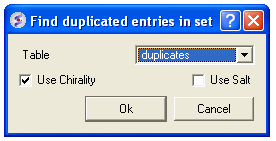
  • Enter the table name you want to check for duplicates
  • Enter whether you want chirality or the salts included in the analysis.
  • Press OK
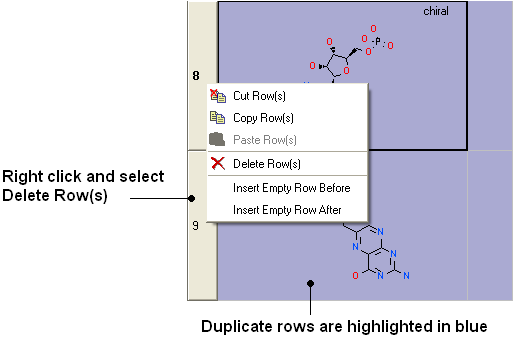
  • Duplicate compounds will be highlighted blue in the table. You can delete them by right clicking on the row header ans selecing Delete Rows(s)


Prev
Sort Table
Home
Up
Next
Enumerate by Markush

Copyright© 1989-2004, Molsoft,LLC - All Rights Reserved.
This document contains proprietary and confidential information of Molsoft, LLC.
The content of this document may not be disclosed to third parties, copied or duplicated in any form,
in whole or in part, without the prior written permission from Molsoft, LLC.