May 16 2012 Feedback.
Contents
 
Introduction
How Tos & Videos
Getting Started
Protein Structure
Molecular Graphics
Slides and Documents
ActiveICM
Movie Making
Sequences & Alignments
Protein Structure Analysis
Protein Superposition
Crystallographic Analysis
Homology & Modeling
3D Predict
Molecular Mechanics
Cheminformatics
Chemistry Menu
Docking
AQUASITES
3D Ligand Editor
 Setup Ligand and Receptor
 Preferences
 Pocket Surfaces
 Display Hbonds
 Energy Circles
 Re-Dock
 Fragment Linking
 Save docked ligand
 Edit Ligand
 Replacement Group
 Ligand Tethers
 Multiple Receptor Docking
 Dock apf
 Export Docking Project
Tables
Local Databases
Tutorials
FAQs
 
Index
Prev
20.13 Dock to Atomic Property Fields
Next

The Atomic Property Fields (APF) superposition/alignment method was first reported by Maxim Totrov PhD (Principal Scientist - MolSoft) at the 2007 233rd American Chemical Society National Meeting, Chicago, IL USA and then published here.

APF is a 3D pharmacophoric potential implemented on a grid. APF can be generated from one or multiple ligands and seven properties are assigned from empiric physico-chemical components (hydrogen bond donors, acceptors, Sp2 hybridization, lipophilicity, size, electropositive/negative and charge).Here we describe template APF superposition whereby the APF is generated from a single or multiple template and is then globally optimized with the internal force-field energy of the ligand.
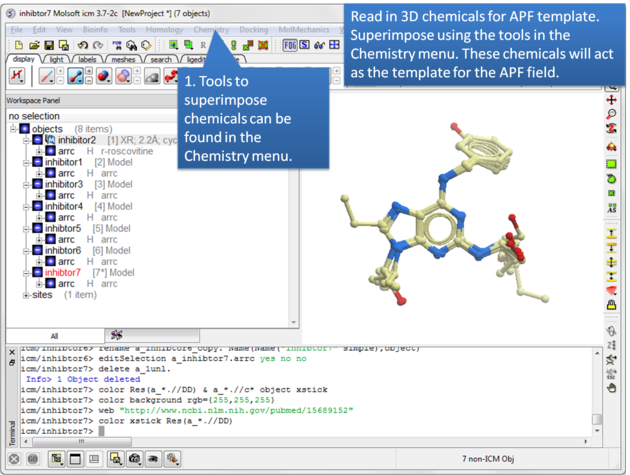
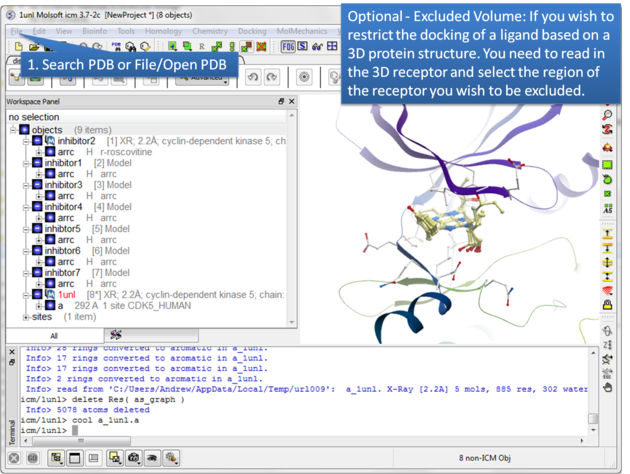
Step 1: Read in the chemicals that will make up the Atomic Property Field you wish to dock to.

Step 2: Certain regions of the pocket can be excluded from docking by selecting an excluded volume.

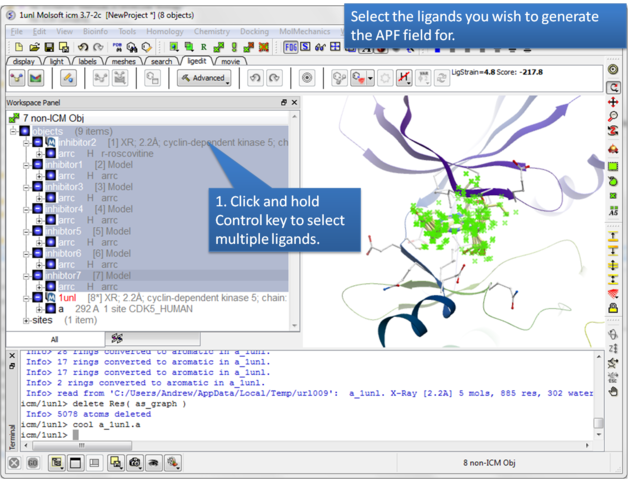
Step 3: Select the ligands you wish to generate an APF field for.

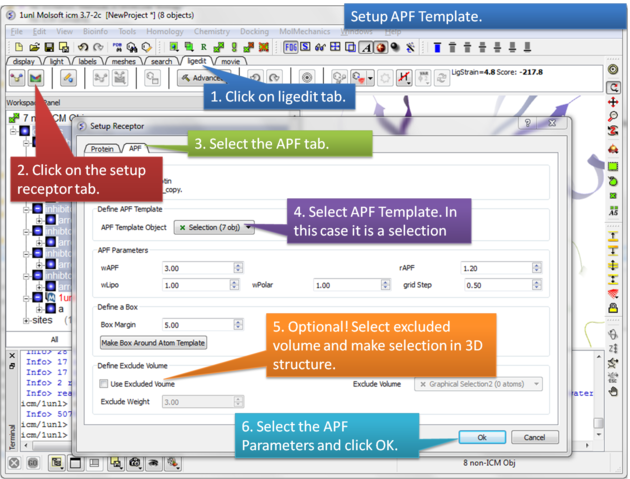
Step 4: Setup the APF template. The APF parameters are:
  • wAPF = relative weight of APF with respect to internal force-field energy. Adjusts tolerance to strain relative to enforcement of chemical alignment.
  • wLipo = relative weight of lipophilic atoms.
  • wPolar = relative weight of polar atoms.
  • rAPF = radius of APF gaussians. Can be used to adjust 'softness'/tolerance of molecular alignment.
  • grid step = use with caution, potentially can be reduced to allow very 'sharp' alignments.

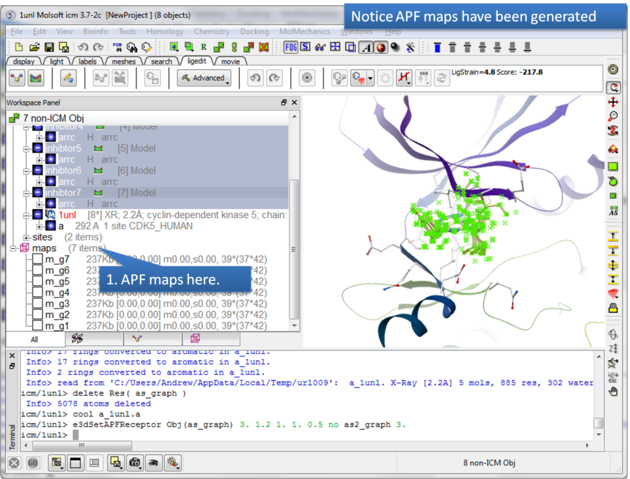
Step 5: The APF maps are listed in the ICM Workspace left hand side.

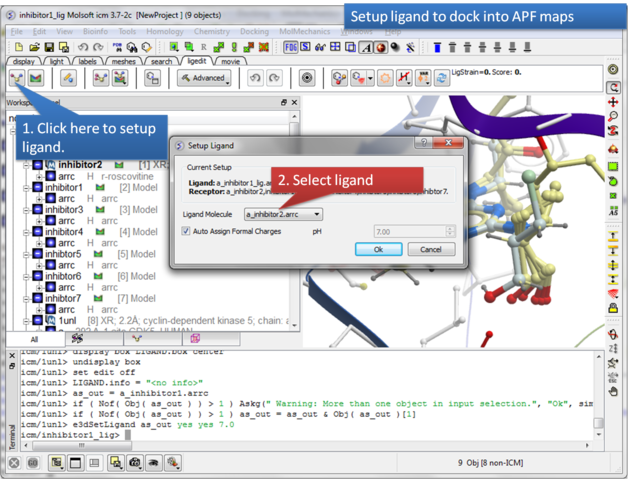
Step 6: Select the ligand you wish to dock into the APF maps.

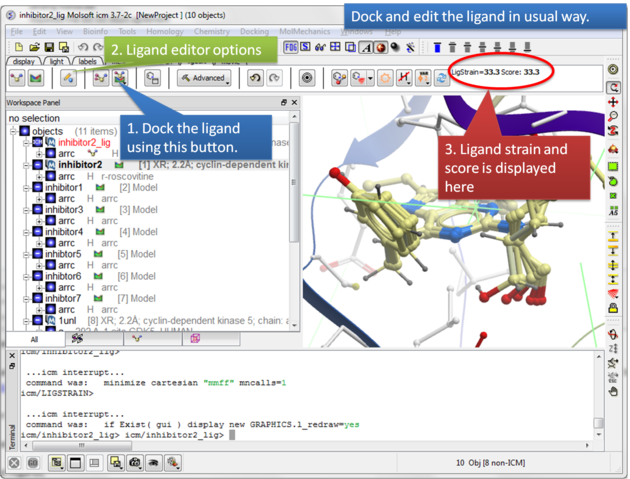
Step 7: Dock the ligand using the ligand docking button and note the Score.

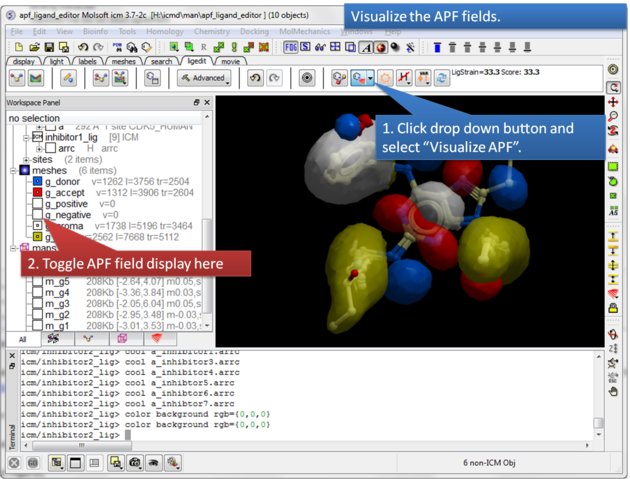
Step 8: Visualize the APF maps.


Prev
Multiple Receptor Docking
Home
Up
Next
Export Docking Project

Copyright© 1989-2011, Molsoft,LLC - All Rights Reserved.
This document contains proprietary and confidential information of Molsoft, LLC.
The content of this document may not be disclosed to third parties, copied or duplicated in any form,
in whole or in part, without the prior written permission from Molsoft, LLC.