May 20 2013 Feedback.
Contents
 
Introduction
How To Guides & Videos
Getting Started
Protein Structure
Molecular Graphics
Slides and Documents
ActiveICM
Movie Making
Sequences & Alignments
Protein Structure Analysis
Protein Superposition
Crystallographic Analysis
Homology & Modeling
3D Predict
Molecular Mechanics
Cheminformatics
Chemistry Menu
Docking
3D Ligand Editor
 Setup Ligand and Receptor
 Preferences
 Pocket Surfaces
 Edit Ligand
 After Editing the Ligand
 Replacement Group
 Display Hbonds
 Energy Circles
 Re-Dock
 Fragment Linking
 Ligand Tethers
 Impose Distance Restraints
 Multiple Receptor Docking
 Covalent Docking
 Dock to APF
 Save Docked Complex
 Export Docking Project
Tables
Local Databases
KNIME
Tutorials
FAQs
 
Index
PrevICM User's Guide
19.6 Find Best Replacement Group
Next

Find best replacement group for selected atom

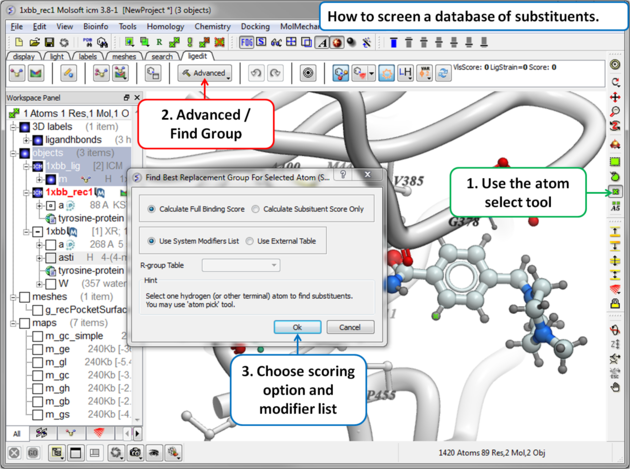
  • Select the atom you want to add a new replacement group to.
  • Click on the Advanced/Find Group button.
  • A dialog box as shown below will be displayed. Select whether you want the substituent score only to be evaluated (quick) or the full binding score.
  • Select whether you want to screen the modifying groups built into ICM (see sarray of smiles called LIGAND.modifiers) or a table of your own modifier groups. If you choose your own table you will need to load the table (sdf file) into ICM and enter the name of the table into this dialog box or you can add modifiers to the sarray of smiles called LIGAND.userModifiers.

  • ICM will add each fragment to the target atom and sample the energy and return a table ranked by score (see below).


Prev
After Editing the Ligand
Home
Up
Next
Display Hbonds

Copyright© 1989-2013, Molsoft,LLC - All Rights Reserved.
This document contains proprietary and confidential information of Molsoft, LLC.
The content of this document may not be disclosed to third parties, copied or duplicated in any form,
in whole or in part, without the prior written permission from Molsoft, LLC.