| Available in the following product(s): ICM-Browser | ICM-Browser-Pro | ICM-Pro |
To display and undisplay layers of a structure you can use the buttons shown below. Seven layers can be created and within each layer different structural representations can be displayed.
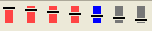
Right click on one of the layer buttons and a number of options can be chosen as shown below.
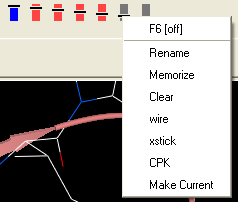
To change the display in one of the layers:
- Right click on one of the layer buttons.
- Select a representation wire, xstick or CPK.
- You can do this for each of the seven layer buttons.
- Click on the layer button to display and undisplay. If the layer button is shaded red then the layer is not displayed. If the layer button is shaded light blue then it is displayed. You can switch between layers by clicking on the button or using the. You can use the memorize button to store a particular representation and clear to remove a memorized representation.