| Prev | ICM User's Guide 6.1 Molecule Representation | Next |
[ Wire | Stick/Ball | Ribbon | Skin | CPK | Surface | Hydrogens | Hydrogen Bond | Formal Charges | ca-trace ]
| Available in the following product(s): ICM-Browser | ICM-Browser-Pro | ICM-Pro |
To change the molecule display representation:
- Select the atoms, residues, molecules, or objects you wish to change in the graphical display or in the ICM Workspace.
- Then use the molecule representation (e.g. wire, ribbon) options in the Display Tab.
The display tab contains tools for a variety of functions including - structural representations, coloring, labeling and superposition.
There are six main types of structural representation in ICM. They are wire, ball and stick (Xstick), ribbon, skin, CPK and dot envelope (surface).
To display one of these representations:
- Click on the representation button you desire in the display tab.
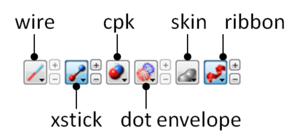
To remove a displayed representation or to toggle between display and undisplay:
- Click on the corresponding representation button in the display tab.
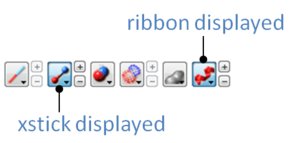
Identify which representations are displayed: The button display will change appearance (shaded blue) when selected. This makes it easier to identify which representations are currently being displayed.
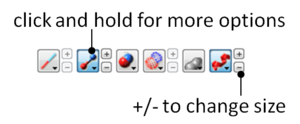
Change the display and size of the representations Many characteristics of the graphical representation such as color can be changed by clicking and holding on the button. The size can be changed by clicking the plus(+) and minus(-) buttons next to them.
6.1.1 Wire Representation |
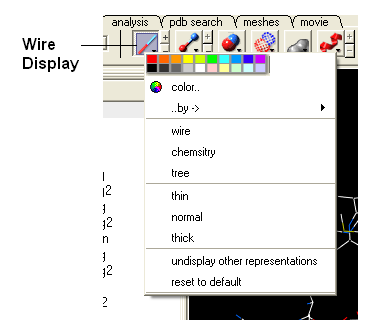
Click and hold on the wire representation button. A menu will be displayed as shown below.
To change the wire style:
- Click and hold on the wire representation button and then click on wire, chemistry or tree.
To change the size of the wire representation:
- Click and hold on the wire representation button and then click on thin, normal or thick.
| NOTE: Clicking on the +/- next to the wire representation button also changes the thickness of the wire representation. |
To undisplay representations other than wire:
- Click and hold on the wire representation button and then click on undisplay other representations.
If you make a mistake or you are not happy with the way your structure is displayed with the wire representation:
- Click and hold on the wire representation button and then click on reset to default.
6.1.2 Stick and Ball (Xstick) Representation |
Click and hold on the stick and ball representation button. A menu will be displayed as shown below.
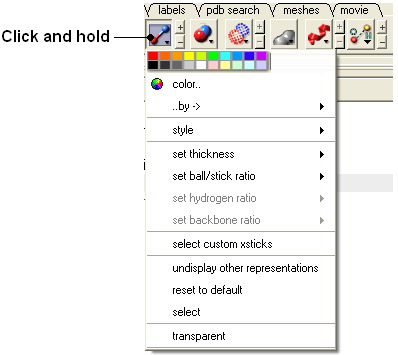
To change the style of the Xstick representation:
- Click and hold on the stick and ball representation button and then click on style and choose either plain, chemistry, Chem Plus, or Chem Plus Aromatic.
To change the size of the Xstick representation:
- Click and hold on the stick and ball representation button and then click on set thickness , set ball/stick ratio, set hydrogen ratio, and set backbone ratio.
| NOTE: Clicking on the +/- next to the xstick representation button also changes the thickness of the xstick representation. |
In order to make some parts of your picture clearer, the xstick representation can be set to transparent:
- Click and hold on the stick and ball representation button and then click on transparent.
To undisplay representations other than xstick:
- Click and hold on the stick and ball representation button and then click on undisplay other representations.
If you make a mistake or you are not happy with the way your structure is displayed with the xstick representation:
- Click and hold on the stick and ball representation button and then click on reset to default.
6.1.3 Ribbon Representation |
Click and hold on the ribbon representation button and a menu will be displayed.
To change the style of the Ribbon representation:
- Click and hold on the ribbon representation button and then click on a style option: smooth, wide, wide smooth, cylinders, protein worm .
To assign secondary structure:
To accurately represent the secondary structure of the molecule in ribbon representation you may wish to assign secondary structure:
- Click and hold on the ribbon representation button and then click on assign sec. structure.
To make some parts of your picture clearer, the ribbon representation can be set to transparent:
- Click and hold on the ribbon representation button and then click on transparent.
To undisplay representations other than ribbon:
- Click and hold on the ribbon representation button and then click on undisplay other representations.
If you make a mistake or you are not happy with the way your structure is displayed with the ribbon representation:
- Click and hold on the ribbon representation button and then click on reset to default.
| NOTE: Always use the ICM assign sec.** structure tool in the ribbon right click menu to get accurate secondary structure assignment. This is particularly important when studying helices which may have non-canonical elements within them such as 3/10 or pi. To view non-cannonical helix segments use the segment option in the ribbon right click menu. |
To change the display of chain breaks (dotted lines):
- Click and hold on the ribbon representation button.
- Select the options Display Chain Breaks or Display Chain Break label.
6.1.4 Skin Representation |
Click and hold on the skin representation button. A menu will be displayed as shown below.
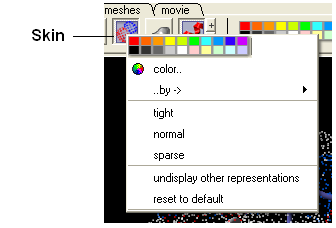
To make some parts of your picture clearer, the skin representation can be set to tight, normal or sparse:
- Click and hold on the skin representation button and then click on either tight, normal or sparse.
To undisplay representations other than skin:
- Click and hold on the skin representation button and then click on undisplay other representations.
If you make a mistake or you are not happy with the way your structure is displayed with the skin representation:
- Click and hold on the skin representation button and then click on ** reset to default**.
| NOTE: Sometimes due to singularity problems holes may appear within the skin surface. To cure this infliction select atoms nearby and right click select Advanced->RandomizeAtoms |
6.1.5 CPK Representation |
Click and hold on the CPK representation button. A menu will be displayed as shown below.
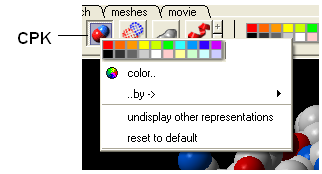
To undisplay representations other than CPK:
- Click and hold on the CPK representation button and then click on undisplay other representations.
If you make a mistake or you are not happy with the way your structure is displayed with the cpk representation.
- Click and hold on the CPK representation button and then click on reset to default.
6.1.6 Surface Representation |
Click and hold on the surface representation button. A menu will be displayed as shown below.
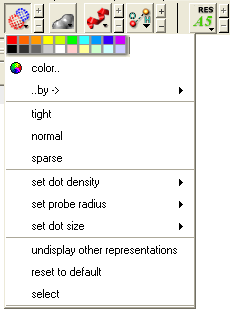
To change the style of the surface representation:
- Click and hold on the surface representation button and then click on tight, normal, or surface.
To undisplay representations other than surface:
- Click and hold on the surface representation button and then click on undisplay other representations.
If you make a mistake or you are not happy with the way your structure is displayed with the surface representation:
- Click and hold on the surface representation button and then click on reset to default.
6.1.7 Display and Undisplay Hydrogens |
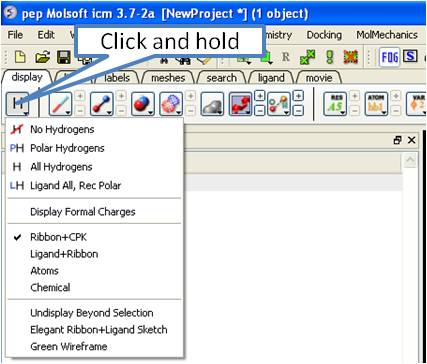
To display and undisplay hydrogens. Click and hold on the "Change Hydrogen Display" button shown below. Multiple single clicks will toggle through the hyrogen display options.
- Display Tab
- Click and hold on the "Change Hydrogen Display" button shown below.
6.1.8 Display Hydrogen Bond |
| NOTE: The method by which hydrogen bonds are calculated is described here in the command line manual. The GRAPHICS.hbondMinStrength parameter determines the hbond strength threshold for hbond display. The strength value is between 0. and 2. By changing 1. to 0.2 you will see more weak hydrogen bonds. |
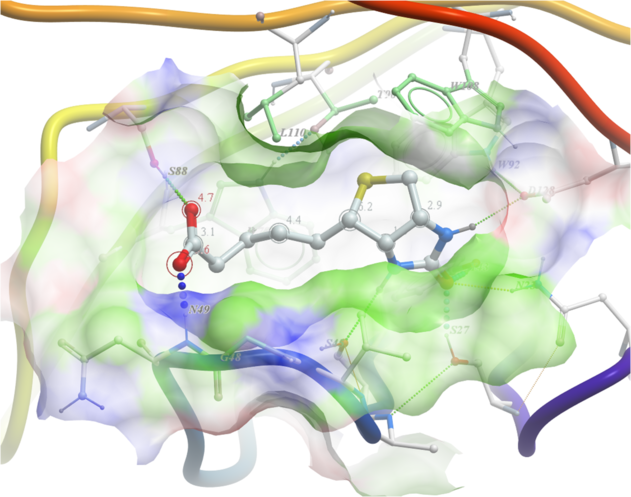
In order to display potential hydrogen bonds in your structure:
- Convert to an ICM Object
- Make a selection - if you are trying to display the H-bonds between a ligand and the receptor make sure the ligand is part of the selection.
- Click the Display Tab.
- Click on the Toggle H-bonds icon in the display tab.
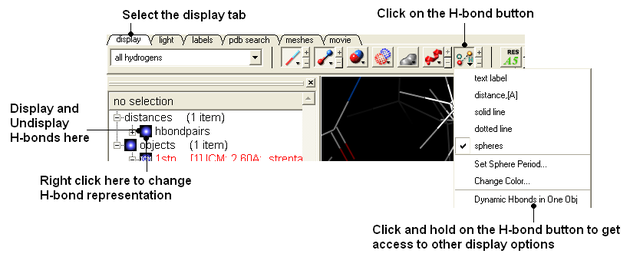
- Click the +/- on the right of the H-Bond button to change thickness of H-bond representation.
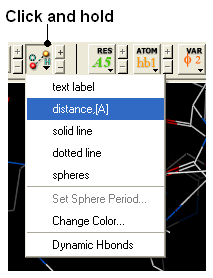
- Click and hold the button to change representation or use the hbondpairs option in the ICM Workspace.
What do the default coloring of the H-bond represent?
Longer and shorter H-X distances in the hydrogen bond are color-coded, from red to blue, respectively.
| NOTE Dynamic hydrogen bonds can be set by clicking and holding on the H-bond toggle button in the Display tab. Hydrogen bonds will then respond to any changes made to the ligand. |
6.1.9 Display Formal Charges |
You can display formal charges by clicking and holding on the "Change Hydrogen Display" button in the Display tab.
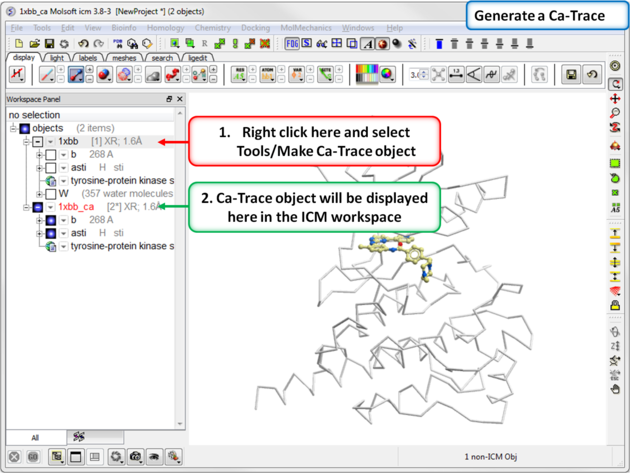
6.1.10 Ca (carbon alpha) Trace |
To generate a carbon alpha (Ca) trace:
- Right click on the object in the ICM workspace and select Tools/Make Ca-Trace object.
- The Ca-Trace object will be displayed in the ICM workspace.
| Prev Molecular Graphics | Home Up | Next Multi Windows |