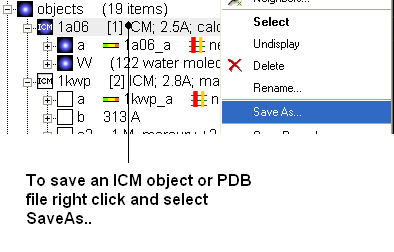
Any ICM object such as a structure, sequence, or alignment, can be saved for use at a later time.
To save an object:
- Right click on the object name in the ICM workspace or ICM alignment editor and a menu will be displayed.
- Click on the Save As... option.
- Enter the unique name you wish to call your object in the box labeled File name:
- Choose which folder or directory you wish to save your object by clicking scrolling down in the box labeled Save in:
- Choose which file type you would like to save your object as by scrolling down in the box labeled Save as type . ICM structure objects should have the file ending yourfilename.ob and alignments yourfilename.ali
- Once the appropriate information has been entered click on the Save button in the bottom right hand section of the window.
- The object is now saved.